Pixels & events sends Pendling's events (a charm shown, clicked, a coupon revealed, a lead) to your analytics and ad platforms, under the names you want, respecting your visitors' cookie choices.
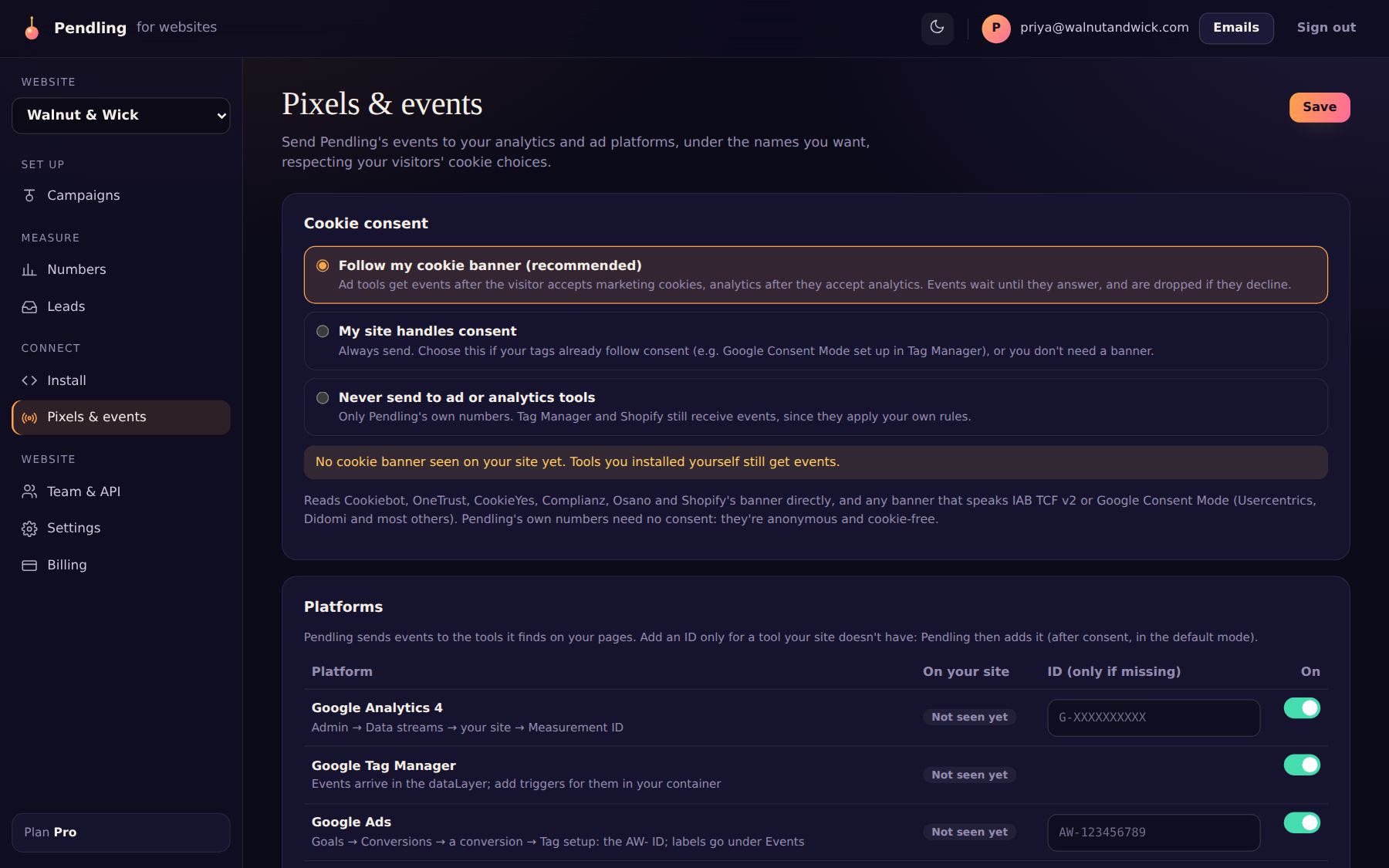
1. Cookie consent
- Follow my cookie banner (recommended): Pendling reads Cookiebot, OneTrust, CookieYes, Complianz, Osano and Shopify's banner directly, and any banner that speaks IAB TCF v2 or Google Consent Mode (Usercentrics, Didomi and most others), and only sends once a visitor agrees. Pendling's own numbers need no consent: they're anonymous and cookie-free.
- My site handles consent: always send. Choose this if your tags already follow consent (for example Google Consent Mode in Tag Manager), or you don't need a banner.
- Never send to ad or analytics tools: only Pendling's own numbers.
2. Platforms
Pendling finds the tools already on your site. For each one, switch it on, or add its ID for Pendling to load it: Google Analytics 4 (Measurement ID), Google Tag Manager (events arrive in the dataLayer), Google Ads (the AW- ID, with a conversion label per event), Meta (Facebook, Instagram), TikTok, Pinterest, LinkedIn and Microsoft Ads (Bing).
3. Events
Untick an event to not send it, or rename it. Names, emails and phone numbers from lead forms are never sent to any platform.
Shopify checkout
Shopify runs checkout tracking in a sandbox your theme's pixels can't reach, so Pendling also publishes its events to Shopify's customer events, for a Custom pixel to pick up. The page has the code to paste.
Check it works
Check it works opens your site with the debug panel: which cookie banner and tools it found, and for every event, where it went or why not.